Key takeaways
- Track studio humidity so greenware dries evenly and plaster molds stay mold-free. Compare five hygrometers, from desktop gauges to app-logging sensors.
- Top Pick: ThermoPro TP49 Digital Hygrometer
- Runner-up: TempPro TP50 Digital Hygrometer
- Also consider: Govee H5075 Bluetooth Hygrometer
Every drying problem in a pottery studio is really a humidity problem wearing a disguise. Pots that crack at the rim dried too fast at the surface while the foot stayed wet. Plaster molds that go soft and spotty have been drinking moisture out of the air for weeks. Glaze powder clumps because the room never drops below the damp threshold where dry materials stay dry. A hygrometer turns that guesswork into one number you can act on. The five gauges below cover every monitoring style a studio needs: two simple desktop units, a larger desktop model with daily records, a Bluetooth gauge that logs data to a phone app, and a premium app sensor with alerts for studios that sit empty between sessions.
As an Amazon Associate, we earn from qualifying purchases.
Quick Answer
For most pottery studios, the ThermoPro TP49 is the right first hygrometer: it reads temperature and relative humidity at a glance, refreshes every ten seconds, and mounts on a wall, magnet, or stand. Studios that sit empty for days should step up to the SensorPush HT1, which logs readings continuously and sends phone alerts when humidity drifts out of range.
Why One Number Runs the Whole Drying Shelf
Clay dries by giving up water to the air, and the air accepts that water at a rate set by relative humidity. At high humidity, a freshly thrown pot barely dries at all, which is useful during the first day when handles and attachments need to equalize with the body. At low humidity, the same pot sheds water fast, and thin sections race ahead of thick ones until stress cracks open the seams. Neither extreme is good or bad on its own. What matters is knowing which condition your studio is actually in, because the fix differs each time: tent the ware board, open a window, run the dehumidifier, or leave everything alone.
A hygrometer also protects the parts of the studio that are not clay. Plaster molds, bats, and casting slips degrade in persistently damp air, and dry glaze ingredients absorb moisture until they cake and weigh inaccurately. Watching the trend across a week tells you whether a damp spell is a passing afternoon or the new seasonal normal, which decides whether you need a drying cabinet or just need to move ware boards away from the reclaim corner. Placement matters as much as the gauge: hang the sensor at ware-board height, away from kiln heat and fan airflow, or the number describes the kiln corner rather than the room your pots live in.
The Five Hygrometers Worth Putting in a Studio
ThermoPro TP49 Digital Hygrometer

The TP49 is the gauge most studios should start with. It pairs a large, easy-reading display with a ten-second refresh rate, so walking past the drying shelf gives you a current number rather than a stale one. A small face icon marks the air as dry, comfortable, or wet, translating the percentage into a quick decision about covering ware. The housing stands on a table, sticks to a metal shelf upright by its magnetic back, or hangs from a screw, so it can live at ware height where the reading matters.
Specs:
– Humidity range: 10 to 99 percent relative humidity
– Temperature range: minus 58 to 158 degrees Fahrenheit
– Accuracy: plus or minus 1 degree Fahrenheit; plus or minus 2 to 3 percent humidity
– Refresh rate: every 10 seconds
– Power: one AAA battery
– Mounting: tabletop stand, magnetic back, hanging hole
TempPro TP50 Digital Hygrometer

The TP50 adds memory to the same desktop formula. It records the highest and lowest temperature and humidity since the last reset, which answers the question every potter asks after a lost weekend: how damp did the studio get while nobody was watching. A maximum humidity reading far above the Monday morning number means the room has a damp problem that only shows up when the kiln room cools overnight. The comfort indicator and large digits keep it readable across a room, and the magnetic back parks it on a steel ware cart.
Specs:
– Humidity range: 10 to 99 percent relative humidity
– Temperature range: minus 58 to 158 degrees Fahrenheit
– Records: daily maximum and minimum for temperature and humidity
– Accuracy: plus or minus 1 degree Fahrenheit; plus or minus 2 to 3 percent humidity
– Power: one AAA battery
– Mounting: tabletop stand, magnetic back, hanging hole
Govee H5075 Bluetooth Hygrometer
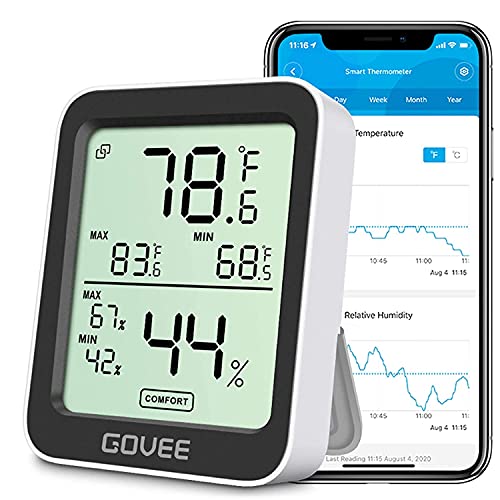
The H5075 keeps the desktop display but adds a Bluetooth link to the Govee Home app, which stores up to two years of readings and exports them as a file. That history is genuinely useful in a studio: line the humidity curve up against your drying log and patterns appear, such as the spike every time a full reclaim bucket sits open. The app also pushes an alert when humidity crosses a limit you set, so a damp spell in a rented studio across town reaches your phone before mold reaches the molds. Its sensor refreshes every two seconds, the fastest cadence on this list.
Specs:
– Humidity range: 0 to 99 percent relative humidity
– Temperature range: minus 4 to 140 degrees Fahrenheit
– Accuracy: plus or minus 3 percent humidity; plus or minus 0.54 degrees Fahrenheit
– Bluetooth range: 164 feet
– Refresh rate: every 2 seconds
– Data: app storage for 2 years with export, out-of-range alerts
– Power: two AAA batteries
SensorPush HT1 Wireless Sensor

The HT1 takes the opposite approach to a display: it has none. The small sensor simply measures, stores twenty days of readings on board, and syncs everything to the SensorPush app whenever your phone comes within Bluetooth range, with an optional gateway for studios that want readings pushed over the internet around the clock. Its accuracy is the tightest here, and the sampling is continuous, so the graph shows the full overnight curve rather than two snapshots. For a shared or rented studio that sits locked between sessions, that record separates suspecting a damp problem from proving when it happens.
Specs:
– Humidity range: 0 to 100 percent relative humidity
– Temperature range: minus 40 to 140 degrees Fahrenheit
– Accuracy: plus or minus 3 percent humidity; plus or minus 0.54 degrees Fahrenheit
– Bluetooth range: 325 feet line of sight
– Storage: 20 days on the sensor, unlimited in the app
– Sampling: once per minute
– Power: one CR2477 battery, roughly one year of life
AcuRite 00613 Indoor Humidity Monitor

The 00613 is the old-school desktop option, a pre-calibrated gauge with a comfort level indicator and daily high and low records for temperature and humidity. Its humidity floor of 16 percent is the highest on this list, which is no handicap in practice: a studio below that mark has air dry enough to crack ware in hours, and the gauge still shows the trend long before things get there. The one-button design and large readout suit shared studios where the gauge must make sense to whoever walks in, with no app accounts or pairing involved.
Specs:
– Humidity range: 16 to 98 percent relative humidity
– Temperature range: minus 4 to 158 degrees Fahrenheit
– Records: daily high and low for temperature and humidity
– Display: comfort level indicator with large digits
– Power: one AA battery
– Mounting: tabletop easel stand with integrated clip
How to Choose
Start with how often someone is actually in the studio. A home studio you walk through daily needs only a glanceable display, and the TP49 or TP50 covers that. A studio visited twice a week justifies a logging sensor, because the readings that damage plaster and ware happen on the days nobody is there to see them.
Accuracy deserves a realistic look. Every gauge here reads within two to three percent of true humidity, which is plenty for drying decisions; you are choosing between tenting a board and not tenting it, not calibrating a laboratory. Refresh speed matters more in practice. A gauge that updates every few seconds reflects the door opening and the kiln firing, while a slow gauge smooths those events away.
Placement decides whether any of this data means anything. Mount the sensor at the height of the ware it protects, a few feet from the kiln, the sink, and any dehumidifier outlet. Two cheap gauges in different corners beat one expensive gauge beside the reclaim buckets, because the spread between corners is itself information about airflow. Finally, decide whether alerts matter. If a burst pipe or a failed dehumidifier would ruin a shelf of molds before your next visit, an app-connected model that phones you is not a luxury.
Who Should Skip a Hygrometer, and What to Reach for Instead
Skip the gauge if your real problem is already diagnosed. A studio with visible mold on the walls and water on the floor does not need a number to confirm it is wet; it needs a dehumidifier and drainage work first, and the hygrometer becomes useful afterward for verifying the fix. Also skip it if your studio is a corner of a climate-controlled home where ware dries on a predictable schedule and nothing has cracked or molded in a year.
Potters fighting slow drying rather than damp should look at airflow instead: a small fan moving air across the ware boards changes drying more than any reading will. And if the question is whether a specific pot is ready to trim or fire, that is a moisture question about the clay itself, answered by touch, weight, and a clay moisture meter, not by the humidity of the room.
Frequently Asked Questions
What humidity level is best for drying pottery?
Most studios dry ware comfortably between 40 and 60 percent relative humidity. Above that band, drying slows to a crawl and plaster stays damp; below it, exposed rims and handles dry far faster than thick bases, which is where cracks start. Use the gauge to hold the middle ground, tenting ware when the room runs dry and uncovering it when the room runs wet.
Where should a hygrometer sit in a pottery studio?
Place it at the height of your drying shelves, on a wall or shelf away from the kiln, the sink, and doors that open to the outside, since those spots swing with heat and splashes rather than with the room. If the studio has a damp corner and a dry corner, put the gauge in the damp one, where molds and stored materials suffer first.
Can one hygrometer cover a large studio?
One gauge covers the air immediately around it, and a big studio can hold two different climates at once, especially with a kiln at one end. A practical setup is a simple desktop gauge at the ware boards plus a logging sensor near the plaster and dry-materials storage. Comparing the two readings once a week tells you more than a single precise instrument will.
How accurate do studio hygrometers need to be?
Within two to three percent is enough for every drying and storage decision a potter makes, and the gauges here meet that bar. What changes outcomes is not a decimal place but consistency: use the same gauge, in the same spot, and judge by the trend across days rather than a single reading.
Final Verdict
Buy the ThermoPro TP49 if the studio is part of your daily rounds; it is accurate, fast, and readable at a glance. Choose the TempPro TP50 for overnight highs and lows without an app. Step up to the Govee H5075 for app history and alerts at a mid-range tier, or the SensorPush HT1 for the most accurate continuous logging in a studio that sits empty. The AcuRite 00613 remains the simple, sturdy desktop pick for shared spaces. Any of them beats guessing, which is what cracks pots.